TZX MESH
Sign in GET STARTED

SELF-HOSTED MESH NETWORK · AGPL-3.0

Your mesh. Your servers.
Your call on every device.

TZX Mesh is a WireGuard mesh with a control plane you run yourself. Every new device waits at the door until you admit it. No seat caps, no cloud dependency, source you can read.

INSTALL ON YOUR VPS
$curl -fsSL https://tzxmesh.com/install.sh | sh
  • NO SEAT CAPS
  • RUNS ON ANY VPS
  • DEVICE APPROVALS INCLUDED

HOW IT WORKS

Three moves from a blank VPS to a private network

  1. 01

    Install the control plane

    One command on any Debian or Ubuntu VPS brings up management, signalling, relay and a sign-in page behind automatic TLS. Your data stays in your Postgres.

  2. 02

    Enrol devices with a key or a login

    Laptops, servers, phones and containers join with a setup key or single sign-on. Traffic goes peer to peer over WireGuard; a relay carries it only when NAT gets in the way.

  3. 03

    Admit each device yourself

    With approvals on, a new device sees nothing until an administrator lets it in. One key press in the console, one audit event, and it is on the mesh.

WARDEN · DEVICE APPROVALS

The door is closed until you open it

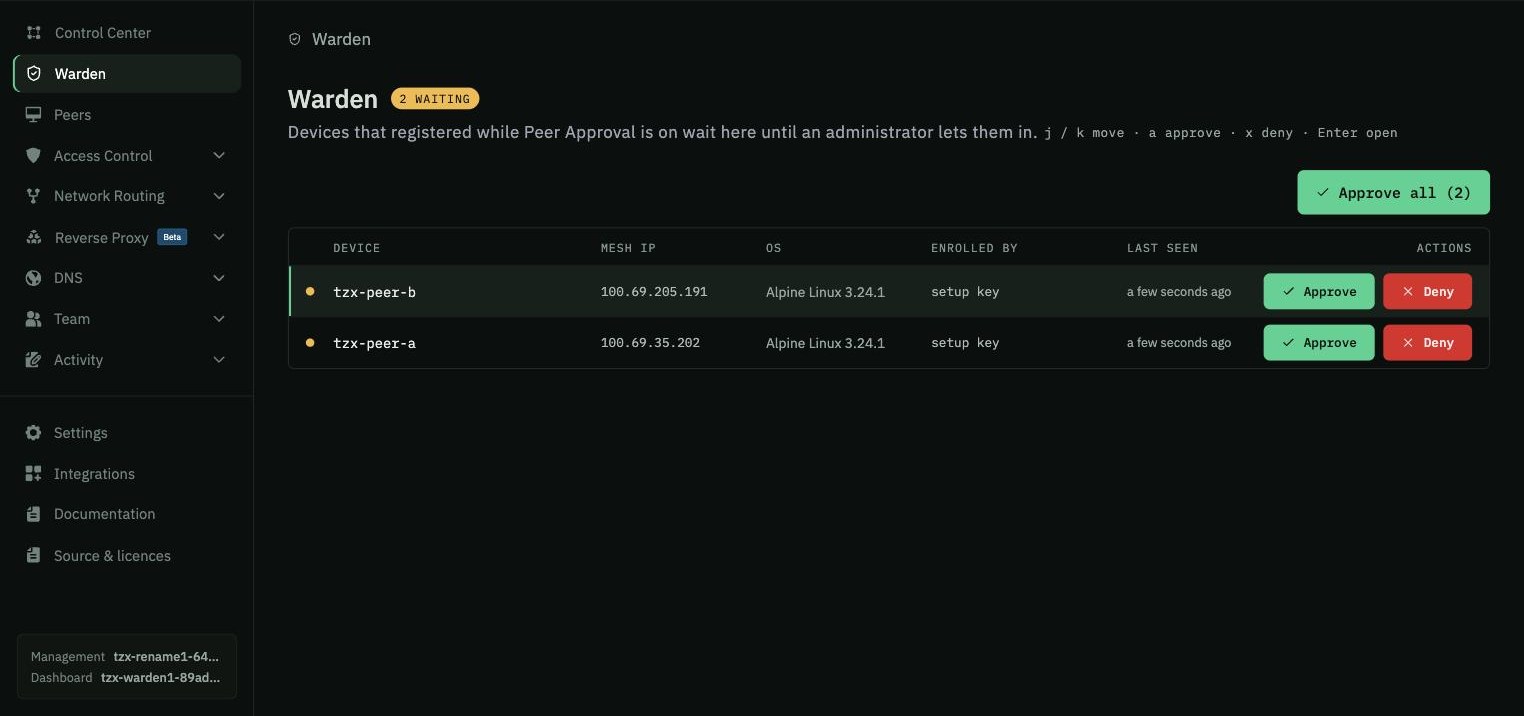
Every device that registers while approvals are on lands in the Warden inbox. Until you approve it, the control plane withholds the network map: it cannot see peers, cannot be seen, cannot route.

Approve or deny from the keyboard, in bulk, or from the row. Revoke later and the device drops off the mesh within a sync cycle. Every action is an audit event with who, what and when.

  • Pending devices isolated both ways, not just hidden
  • j / k · a · x keyboard flow for busy admins
  • Approve, revoke and enable events in the activity log
  • Included at every tier, no upsell
Warden inbox showing two devices waiting for approval with Approve and Deny actions
Warden inbox · live product, not a mockup

EVERYTHING ELSE YOU EXPECT

Exit nodes, offered not seized

A device volunteers to carry other devices' internet traffic, and nothing is routed until an administrator accepts — the same consent the Warden applies to joining, applied to a larger grant. Offer, withdraw, enable and disable are four separate audit events.

Networks

Group devices into named networks. A laptop can sit in two at once and move between them without enrolling again, and each network has its own join key, so a device that enrols with it lands inside already able to reach the others.

Routes and DNS

Publish private subnets through routing peers, resolve peer names under your own domain, push DNS to every device.

Access control

Group-based policies decide who talks to whom. Posture checks keep out-of-date or wrong-OS devices off sensitive groups.

Single sign-on

A built-in identity provider for local accounts, or bring Okta, Entra, Google, Keycloak, any OIDC.

Desktop apps, signed releases

Our own apps for Linux, macOS and Windows, each release signed and published with a manifest the app checks before it installs anything. Containers and phones join with a standard open-source client. Enrol headless machines with setup keys; people sign in.

Every action on the record

Approvals, denials, revocations, expiries and exit-node grants all land in the activity log with who did it and when. The log is the answer to “how did this device get here”, months later.

Source you can read

Control plane and console are AGPL-3.0; the desktop clients are BSD-3-Clause. The running build links to its exact source from the console.
INSTALL

A control plane on your own VPS in a few minutes

Requirements: a Debian or Ubuntu VPS with a public IP, a DNS name pointing at it, ports 443 and 3478 open. Two dedicated cores and four gigabytes run a small network comfortably.

  1. $curl -fsSL https://tzxmesh.com/install.sh | sh
  2. →Answer two prompts: your domain and the owner email.
  3. →Open the console, enable Peer Approval, create a setup key, add your first device.

Prefer to read first? The installer is a short shell script that runs Docker Compose; the compose file, Caddy config and backup script are in the infra repository.

PRICING

Free to run. Pay for support or for us to host it.

COMMUNITY

$0 forever

Everything, self-hosted, AGPL-3.0. Device approvals, exit nodes, SSO, unlimited devices and users.

INSTALL

SUPPORTED

pricing at launch

Managed upgrades, a configuration review and a support line for teams that self-host. The key never disables a feature — signed releases are in every install.

GET NOTIFIED

CLOUD

pricing at launch

We run the control plane, backups and relays, with a Gulf region option. Source published for every deploy.

GET NOTIFIED

COMPARE

Where TZX Mesh sits

TZX MeshTailscaleHeadscaleHamachi
Control plane you host✓—✓—
Device approvals, all tiers✓paid plans—✓
Approval inbox with keyboard flow✓———
Seat or device caps on the free tiernone6 usersnone5 computers
Exit nodes and subnet routes✓✓✓gateway, paid plans
Built-in identity provider✓———
LicenceAGPL-3.0proprietaryBSD-3proprietary
Last stable server release202620262024 (v0.29)hosted only
Pre-approved enrolment (deployment links, keys)✓✓✓paid plans
Phone appsiOS in testing · Android next✓via Tailscale apps—

Comparison as of September 2026 from public documentation and release pages. Tell us if something is out of date.

QUESTIONS

Do my packets go through your servers?

No. Devices talk directly over WireGuard. When NAT blocks a direct path, your own relay carries the encrypted traffic; it never sees plaintext and it runs on your VPS.

What happens to a device that is waiting for approval?

It is registered but isolated. It receives no peers, no routes and no DNS, and approved peers do not learn about it either. Approval is instant and revocable.

Is this a fork of something?

The control plane and console are open-source forks released under the AGPL-3.0, with our own approvals engine, console and tooling on top. The licences page in the console lists every component and links to the exact source of the build you run.

Can I move to the hosted version later?

Yes. The hosted control plane runs the same software; a backup from your VPS restores into it.

Which clients do I install on devices?

Our own TZX Mesh apps for Linux, macOS and Windows — a background service with a tzxmesh command line and a tray app, free under BSD-3-Clause, at tzxmesh.com/dl. Containers and phones use a standard open-source client pointed at your management URL; the iPhone and Android apps are in development.

STAY IN THE LOOP

Get the launch note

One email when supported builds and the hosted control plane open. No newsletter.